
Adding Hotmail to Microsoft Office Outlook
Hotmail accounts use Microsoft’s Exchange ActiveSync or IMAP. The method depends on your Outlook version.
Method 1: Exchange ActiveSync (Recommended for Outlook 2016/2019/365)
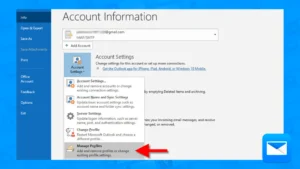
- Open Outlook
- Click File → Add Account
- Enter your Hotmail email address
- Click Connect
- Enter your password
- If prompted for Modern Authentication, approve the sign-in via your Microsoft account (authenticator app, text, or email)
- Click Done
Outlook automatically configures Exchange settings.
Method 2: IMAP (Older Outlook versions or if Exchange unavailable)
Server Settings:
Incoming Mail (IMAP):
- Server:
imap-mail.outlook.com - Port:
993 - Encryption:
SSL/TLS
Outgoing Mail (SMTP):
- Server:
smtp-mail.outlook.com - Port:
587 - Encryption:
STARTTLSorTLS
Setup Steps:
- Open Outlook
- Click File → Add Account
- Select Manual setup or additional server types
- Click Next
- Select POP or IMAP
- Click Next
- Fill in:
- Your Name: (display name)
- Email Address: (your Hotmail address)
- Account Type:
IMAP - Incoming mail server:
imap-mail.outlook.com - Outgoing mail server:
smtp-mail.outlook.com - User Name: (your full Hotmail email address)
- Password: (your Hotmail password)
- Click More Settings
- Outgoing Server tab: Check My outgoing server (SMTP) requires authentication
- Advanced tab:
- Incoming server (IMAP):
993, Encryption:SSL - Outgoing server (SMTP):
587, Encryption:TLS
- Incoming server (IMAP):
- Click OK
- Click Next to test settings
- Click Finish
App Passwords (If you have 2-Factor Authentication enabled)
If your Microsoft account uses two-factor authentication:
- Go to https://account.microsoft.com/security
- Click Advanced security options
- Under App passwords, click Create a new app password
- Copy the generated password
- Use this app password instead of your regular password in Outlook
Troubleshooting
- Authentication failed: Use app password if 2FA is enabled
- Cannot connect: Check SSL/TLS settings match above
- Sync issues: Exchange ActiveSync provides better sync than IMAP
- Missing folders: IMAP may not sync all folders; Exchange is preferred